The Freedom Tools: Best Digital Nomad Gear For Remote Work
Working from a hammock looks incredible on Instagram. In reality? It’s a fast track to physical therapy. You need gear…You need the best digital nomad gear.
If you are one of the 18.5 million Americans currently identifying as digital nomads, you know the struggle. The difference between a “struggling traveler” and a “professional nomad” often comes down to their gear. You don’t need more stuff; you need the right stuff.
We call these the “Freedom Tools”—the specific items that allow you to set up a full, ergonomic office in a coffee shop, airport lounge, or Airbnb in under three minutes.
Below is a curated list of the best-selling, most durable gear available right now. We’ve prioritized weight (because baggage fees are the enemy) and durability (because you can’t wait two weeks for a replacement in rural Vietnam).
The Command Center (Laptop Stands & Ergonomics)
The Problem: “Tech Neck.” The Fix: Elevating your screen.
According to the Cleveland Clinic, your head weighs about 10-12 pounds when neutral. But lean forward 15 degrees to look at a laptop on a table? That force on your neck surges to 27 pounds. That is why a laptop stand is non-negotiable for long-term travel.
The Gold Standard: Roost V3 Laptop Stand

If you ask any veteran nomad what piece of gear they would save in a fire, 50% of them will say their passport, and the other 50% will say their Roost Stand.
-
Why it wins: It is the lightest (just 5.8 oz) and most durable stand on the market. It collapses into a tiny baton that fits in any side pocket.
-
Best for: The serious professional who wants gear to last 5+ years. It’s an investment, but it’s the last stand you’ll ever buy.
The Roost V3 acts less like a simple accessory and more like an ergonomic intervention. Its primary job is to save your posture by lifting your screen anywhere from 6.5 to 12.5 inches, forcing a natural eye-line that eliminates the “nomad hunch” (though you will need an external keyboard and mouse to make it work).
Unlike cheaper, wobbly alternatives, the V3’s interlocking truss frame creates a “Zero Flex” platform, keeping your screen perfectly still even if you’re typing aggressively. It is designed for the speed of travel: the Set-and-Go system pops open in a single motion to your memorized height setting, so you aren’t fiddling with knobs in a busy cafe. Despite being robust enough to secure any 12–18″ laptop via its self-adjusting PivotGrips, the entire unit weighs a mere 6 ounces and packs down impossibly thin, disappearing into your bag until you need it next.
Product Details and Current Price
The Budget Pick: Nexstand K7 Laptop Stand

While the Roost is the “Rolex” of stands, the Nexstand K7 is the “Casio G-Shock”—tough, functional, and a fraction of the price.
-
Why it wins: It offers 90% of the Roost’s functionality for about one-third of the cost. The K7 is the updated, lighter version of the classic K2, weighing just 7 ounces (200g). It uses a reinforced nylon construction that is incredibly sturdy, capable of holding heavy gaming laptops (static load up to 10kg) without wobbling.
-
The “One-Second” Setup: It features a “lightning switch” design that pops open instantly. Unlike cheaper aluminum stands that require fiddling with screws or stiff hinges, the K7 locks into place immediately.
-
Customer Verdict: Users love the stability for larger machines. One reviewer noted, “The best quality of this stand is its stability and capacity to hold big laptops.” Another praised the airflow, mentioning the “minimal contact on your laptop provides 360 degrees of natural air cooling.”
-
Best for: New nomads watching their startup costs or those with heavier 17-inch laptops.
Product Details and Current Price
The “Invisible” Option: MOFT Adhesive Laptop Stand
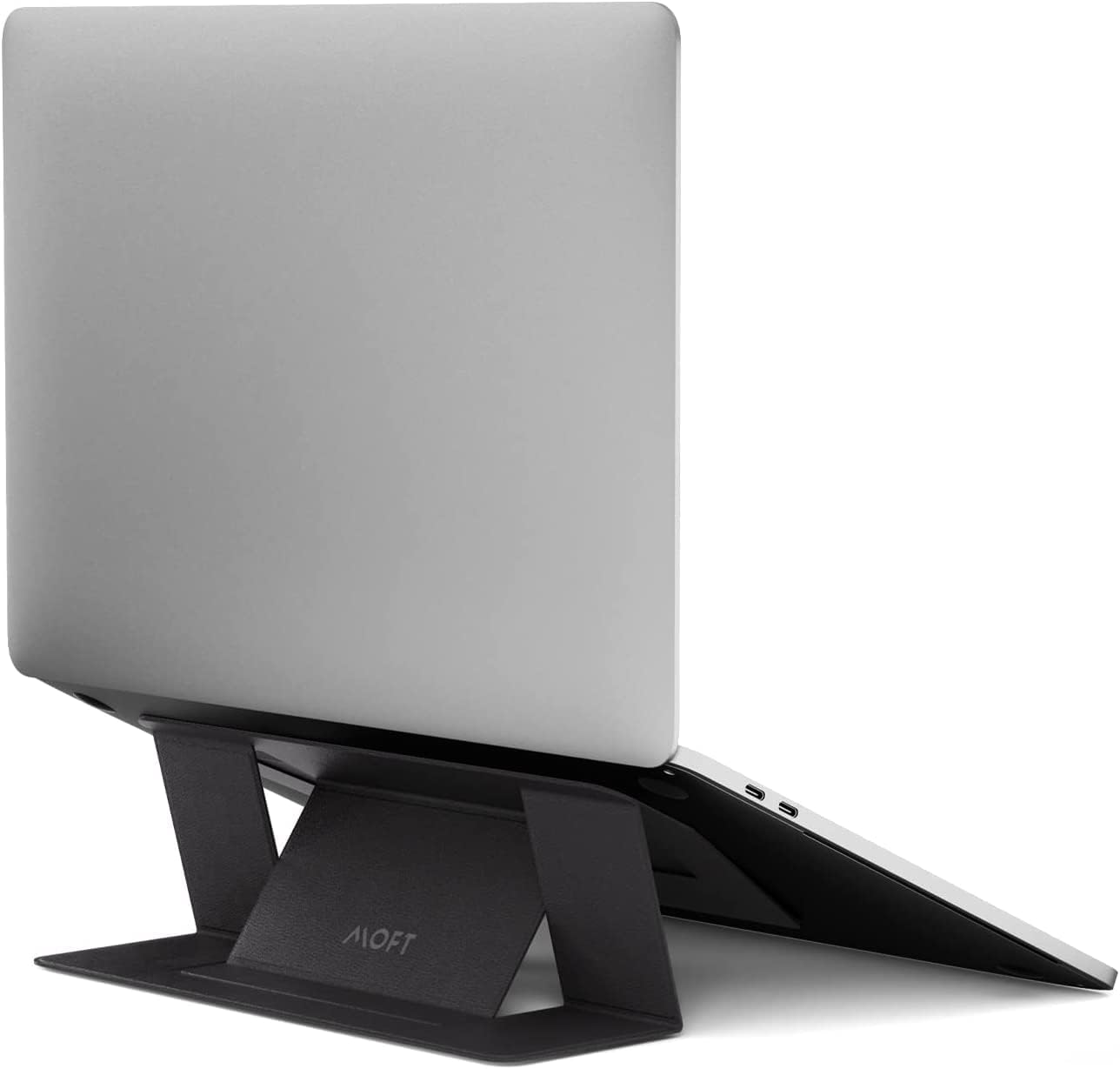
For the minimalist who refuses to carry “extra” gear, the MOFT (Mobile Office for Travelers) is a game-changer.
-
Why it wins: It is a paper-thin (0.1 inch) adhesive stand that sticks to the bottom of your laptop. It weighs practically nothing (3 oz) and holds up to 18 lbs. You can’t lose it because it’s attached to your machine, and it unfolds in a second to give you a 2-inch or 3-inch lift.
-
Customer Verdict: It’s a cult favorite for its “set and forget” nature. A verified buyer raved, “I love how light and discreet it looks, no more lugging around a heavy laptop stand… It fits my MacBook Pro perfectly and it’s quite sturdy.” However, be aware it uses a residue-free adhesive, so it’s best for metal-bottomed laptops (like MacBooks/Dells) rather than those with massive vents on the bottom.
-
Best for: Café hoppers and “one-bag” travelers who count every gram.
Product Details and Current Price
Infinite Power (Charging & Adapters)
The Problem: The “Outlet War.” The Fix: GaN (Gallium Nitride) Technology.
Old travel adapters were just plastic shapes that let your plug fit into a wall; they didn’t actually charge anything. In 2025 and beyond, you need a “GaN” adapter—a new type of semiconductor that runs cooler and faster, allowing tiny bricks to output massive power.
The “One Plug” Solution: EPICKA Universal Travel Adapter (GaN 70W)

The Epicka Universal Travel Adapter is currently the highest-rated travel adapter on Amazon for a reason.
-
Why it wins: It eliminates the need to carry your Apple/PC power brick. You plug your laptop’s USB-C cord directly into the side of this adapter. With 3 USB-C ports and 2 USB-A ports, it can fast-charge a laptop (up to 70W) while simultaneously juicing up your phone, watch, and earbuds.
-
The Travel Stat: It covers 200+ countries (Type C, G, A, I). If you are in the UK one day and Germany the next, you just slide the lever.
-
Customer Verdict: Travelers appreciate the consolidation of gear. One review highlights, “The only drawback is its clunkiness… but it worked well,” while another says, “Fits very nicely in the recessed EU outlets.” It effectively replaces a power strip and three different chargers.
Product Details and Current Price
The “Hotel Savior”: Mogics Super Bagel

Hotel designers seem to love hiding the only power outlet behind the heaviest dresser in the room. The Mogics Bagel is the cult-favorite solution.
-
Why it wins: It is a circular power strip roughly the size of a donut. It features a retractable 3-foot extension cord built inside—a lifesaver when the outlet is far from the bed.
-
Smart Design: Because it is round, large plugs never block each other (a common issue with straight power strips). It includes 5 AC sockets (4 universal, 1 US) and 2 USB ports. The new “Super” version includes an auto-resetting fuse, so you don’t have to carry spare fuses.
-
Customer Verdict: From the “OneBag” community on Reddit: “The best feature I think would be the adapter (the center of the bagel)… It is the most compact US to international adapter out there.” Another user notes, “Compact power strip with USB, donut configuration remains stable on table and avoids outlets blocking each other.”
-
Best for: Digital nomads who work from older hotels or Airbnbs with scarce outlets.
Product Details and Current Price
The Backup: Anker 737 Power Bank (PowerCore 24K)

When the power grid fails in Bali, or you are stuck on a 12-hour flight with broken seat power, the Anker 737 is your insurance policy.
-
Why it wins: It pumps out 140W of power, meaning it can charge a MacBook Pro just as fast as a wall outlet. It features a smart digital display that tells you exactly how many minutes of charge you have left and the real-time input/output wattage.
-
Airline Safe: At 24,000mAh, it is just under the TSA/FAA limit (27,000mAh / 100Wh) for carry-on batteries.
-
Customer Verdict: Reliability is the key theme here. “From completely dead, using my 140w charger, I was able to charge it to 100% in 54 minutes,” says one user. Another confirms, “The 24,000 mAh capacity easily handles multiple phone charges and even powers my laptop.”
Product Details and Current Price
The Portable Studio (Screens & Peripherals)
The Problem: Productivity drops by 42% on a single screen. The Fix: Lightweight expansion.
The Second Screen: ARZOPA Portable Monitor (15.6 Inch)

Portable monitors used to be heavy and dim. The ARZOPA changed the game by being lighter than an iPad and powered entirely by the USB-C cable connected to your laptop.
-
Why it wins: It requires no external power brick. You plug it into your laptop, and it turns on. It features a 1080p FHD IPS screen that weighs just 1.7 lbs and fits in the same laptop sleeve you already use. It comes with a magnetic smart cover that doubles as a stand.
-
Use Case: Editing video or keeping Slack/Email open while you work.
-
Customer Verdict: “It’s ultra-slim, lightweight, and sets up instantly with a simple plug-and-play,” writes a satisfied user. Another review mentions, “The 2.5K screen is super clear with great colors, and it’s so thin and light — perfect for throwing in a bag.” (Note: Some models offer 2.5K, but even the standard 1080p is excellent for office work).
Product Details and Current Price
The “Any-Surface” Mouse: Logitech MX Anywhere 3S

Most mice fail on glass tables (common in hotels) or polished marble (common in cafes). Not this LogitechMX.
-
Why it wins: The “Darkfield” sensor tracks perfectly on glass. It is silent (Quiet Click technology reduces noise by 90%), so you won’t annoy others in a quiet library. The MagSpeed electromagnetic wheel scrolls 1,000 lines per second—crucial for flying through long spreadsheets or code.
-
Battery Life: A single minute of charging gives you three hours of use, and a full charge lasts 70 days.
-
Customer Verdict: “This mouse is a pleasure to use, and I very much appreciate the ‘quietness’ of the clicks,” says a Best Buy reviewer. It is widely considered the gold standard for travel mice.
Product Details and Current Price
Conclusion: The “One-Bag” Test
You don’t need all of this gear to be a digital nomad. However, if you want to protect your posture and productivity, the Stand, Adapter, and Power Bank are the non-negotiables.
Roam on, nomads…